Asynchronous JavaScript to learn before JavaScript Frameworks

In this series of articles, we aimed to cover the following topics:
- Important ES6 Features
- Objects and Array methods
- Asynchronous JavaScript and Fetch API (this article)
- NPM and import/export modules in JavaScript
In the last two articles, we have already covered the first two topics so, in this article, we will talk about Asynchronous JavaScript and Fetch API.
So, without wasting any time let’s get started with the topic:
Before jumping into the details of Asynchronous JavaScript, let us first talk about the execution of Synchronous Code in JavaScript. We will consider a simple example to understand this:
As you can notice, it follows a sequential order, that is all the tasks are executed in the order in which they were coded. Internally the JavaScript engine executes these tasks with the help of Call Stack.
Let’s see how the Call Stack helps in executing our code:

As you can notice, The task that is currently in execution gets added to the Call Stack and is popped from it once it completes its execution.
So, Now, you have an idea about the execution of synchronous code and the Call Stack, let’s get started with asynchronous javascript.
What is Asynchronous JavaScript and Why do I even need it?
JavaScript is a single-threaded language that is it only has one Call Stack which means that it can perform only one task at a time. So, if we try to execute slow(or time-taking) operations in a synchronous manner then they can result in blocking the main thread.
Let’s understand what we mean by Blocking with the help of an example:
The different states of Call Stack for the above example are:
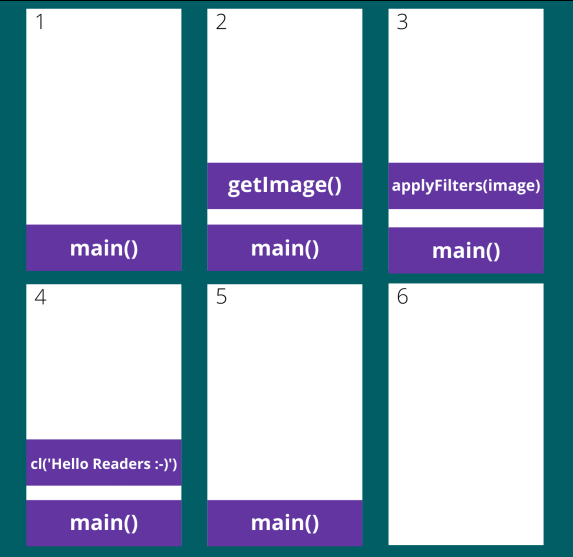
Now, As you can notice, it follows the same sequential order that we have already learned, but, this time the getImages and applyFilters are slow operations that take a huge amount of time to execute and due to them, the main thread is blocked which means that, The page freezes and we can't enter anything in input, or trigger any event.
Note:
- When the program is in the blocked state no links, event listeners, or function works.
- You can easily replicate the blocking behavior by running any infinite or heavy operation in the Developer console window of your browser. An example of one such operation is:
Here is the result of running this code:
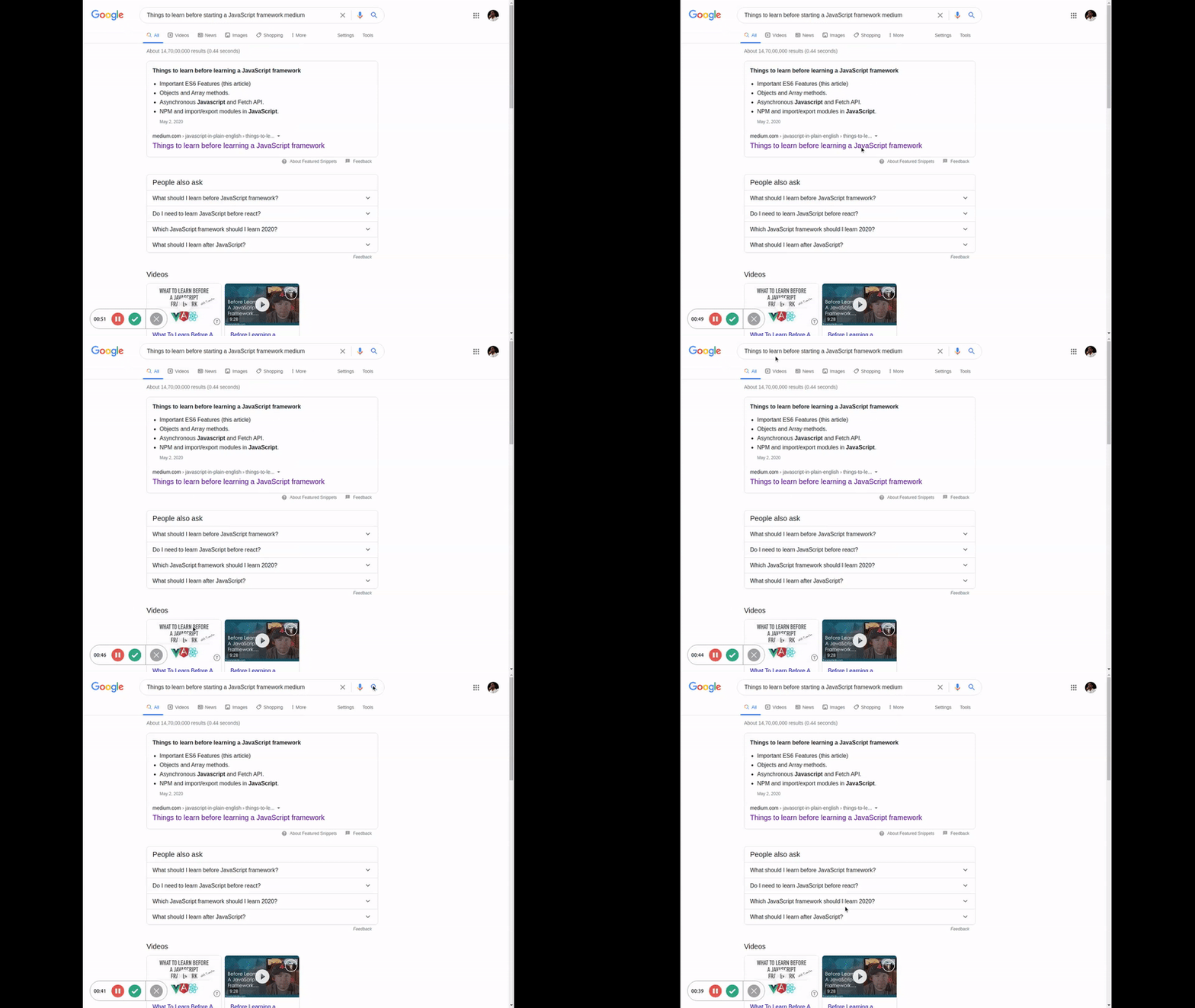
As you can notice, that the page is frozen and none of the events are working, So, as we can clearly say that this is not an ideal situation and so to overcome it and to save all of us from writing blocking code, JavaScript came up with the concept of Asynchrony.
According to Wikipedia:
Asynchrony, in computer programming, refers to the occurrence of events independent of the main program flow and ways to deal with such events.
In the case of JavaScript, as it is a single-threaded language, Asynchrony means to execute only one task at a time but tell the environment to execute a particular task at some later point of time.
Okay, but how do we write a function in JavaScript that gets called after a point of time or how to write an Asynchronous code?
The simplest answer to this is to use Asynchronous Callbacks.
Asynchronous Callbacks
As the name suggests, an Asynchronous Callback is a function that is called when another function finishes its execution. It makes our code non-blocking and provides asynchronous behavior to our code.
The browser provides us with a function named as setTimeout() that accepts two arguments, the first one is the callback function and the second is the minimum time duration after which the callback function should be executed. Let’s see how that works with the help of a simple example:
In the above example, the callback function is called after a second of the program execution.
So, the above example is asynchronous in nature but how that works in the Call Stack or in JavaScript Engine?
Let’s understand that with the help of a video:
As you can notice, along with the Call Stack, now we also have one column for Web APIs and a row for the Callback Queue.
Okay, to understand the execution, let’s break down how those things function:
- Any asynchronous task(like the callback function in this case) gets added to the Web APIs column along with its timer(if it has one).
- Once the timer has finished the callback function gets added to the Callback queue.
- Now, the event loop’s job is to loop through the stack and the queue and if the stack is empty it pushes the first task in the queue onto the stack which effectively runs the task.
To understand it better let’s see another example and this time we will set the duration to 0:
This time the callback is not called right away as the event loop waits for the stack to be empty to push the task onto the queue. Let’s understand the execution with the help of a small video:
Note: From the above example we can learn that the time duration mentioned in the setTimeout() function is the minimum time duration for the callback function to be called or executed.
If you want to learn more about the event loop, web APIs, and other related terminologies then this video is a great watch. Also, here is the link to the website which I have used for showing the working of the JavaScript Engine.
Executing multiple asynchronous operations sequentially
Suppose we have to perform multiple asynchronous operations sequentially, Now, because these operations are all asynchronous so we will have to use asynchronous callbacks to avoid blocking the thread. So, let’s see how we can achieve that:
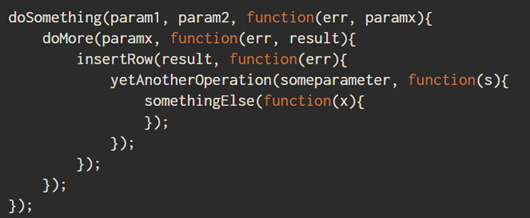
As you can clearly see that now our code is hard to understand and maintain, and it isn’t scalable. This condition is known as Callback hell or the Pyramid of Doom.
Due to less readability and more complexity of Callbacks, the concept of Promises was introduced. Let’s see how Promises solves this problem.
Promise
Promises are objects that wrap an asynchronous code and notify when it’s done. It represents a value that may not be available yet but will be in the future. It helps us to write asynchronous code in a synchronous manner.
A promise object consists of a PromiseStatus and a PromiseValue. The PromiseStatus may have 3 different values:
- Pending (initial state, neither resolved nor rejected)
- Resolved (meaning that the operation succeeded)
- Rejected (meaning that the operation failed)
The PromiseValue consists of the result of the operation, it may be either data in case of success or an error in case of failure.
A promise has three methods which are executed depending upon the status of the promise:
- .then (executed if the promise is resolved)
- .catch (executed if the promise is rejected)
- .finally (executed when the promise is settled either resolved or rejected)
All these methods accept a function and return another promise.
Let’s see the basic syntax of asynchronous code that returns a promise:
Let’s understand the above example line by line:
- Some asynchronous code is executed and it returns a promise.
- If the promise has a status of resolved then the code inside.then() function will be executed.
- If the promise returned has a status of rejected then the code inside .catch() will be executed.
Note: Sometimes you have multiple asynchronous tasks that you want to execute in a sequential manner, also you need to pass the result of the previous step to the next one, In that case, you can chain the .then() methods so that each method performs a particular task and its result will be useful in the execution of the next task.
Let’ s understand how that works on our image example:
So, we can notice that this time our code is more readable and scalable and so as compared to callbacks, promises are easier to use as they make our code more readable and easier to maintain.
Note: Multiple .then() methods can be chained but only one .catch() method is allowed to be used. So, if an error occurs while executing any of the .then() method then the .catch() method catches that error and execute the function passed to it.
Here is an image to help in visualizing the same:

With that knowledge in mind, let’s write some actual code to understand it in a much better way. We will be using the fetch API to make a GET request to https://jsonplaceholder.typicode.com/todos/1.
Fetch API
The Fetch API provides a fetch() method defined on the window object, which is used to perform requests. This method returns a Promise that you can use to retrieve the response of the request.
Let’s see it in practice:
Let’s decode that step by step:
- The Fetch method takes in a url from which the data is to be fetched/posted.
- As a result of the GET request it returns a promise.
- If the promise has a status of resolved then the first .then() method is executed which parses the response into JSON.
- After the execution of the first .then() method the returned result is passed into the second .then() method which prints the data to the console.
- If the promise has a status of rejected then the .catch() method will be executed which prints the error to the console.
So, That’s how to make a simple GET request using the Fetch method. Now, we will see another example to make a POST request. We will be making a post request to https://jsonplaceholder.typicode.com/posts to create a post:
Here, along with the URL, we are also passing an object that consists of the method, body, and headers that are required to make a POST request. The method specified the type of the API request, body consists of the new post data that we are creating and the headers consists of the Content-type.
That’s it for this article, we will discuss the last topic of this series in the next article.
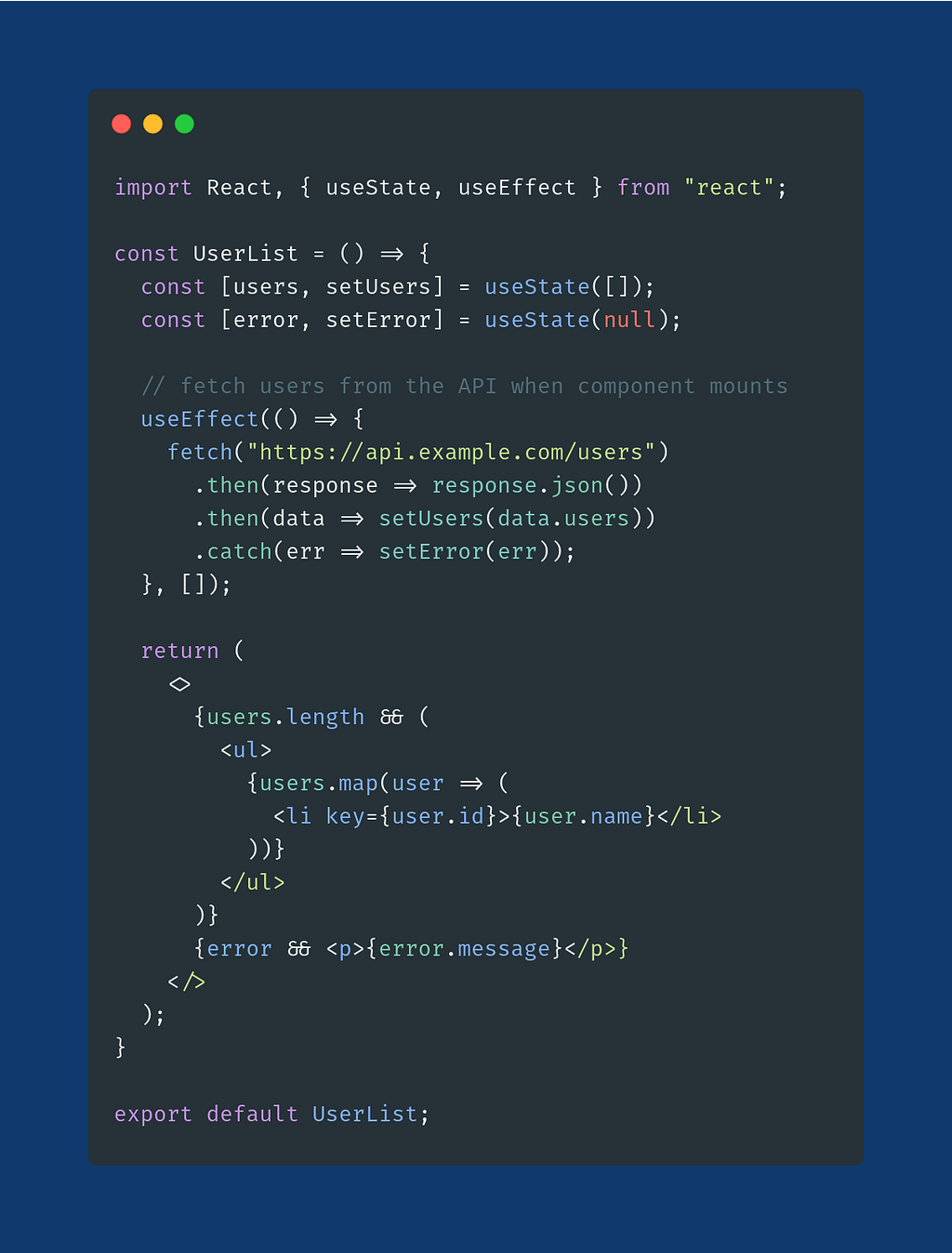
As always, to end this one I will leave you guys with a simple React Component that uses the above concepts:
Also, check out the previous parts (in case you haven’t):
- Things to learn before learning a JavaScript framework
- Object and Array methods to learn before JavaScript frameworks
- How to use NPM (and import/export modules) in JavaScript
In case you want to connect with me, follow the links below:
Asynchronous JavaScript to learn before JavaScript Frameworks was originally published in JavaScript in Plain English on Medium, where people are continuing the conversation by highlighting and responding to this story.